Call Forwarding download for android 11 (Red Velvet Cake)
APK file Call Forwarding 3.6 compatible with Android 11How to install APK / APKS / OBB file on Android
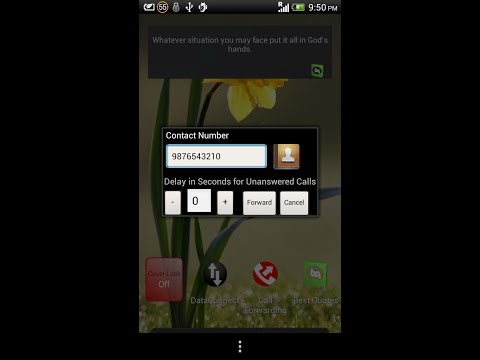

This app is used to forward calls to your other numbers. You can choose number from your contact list and can forward calls to that number.
For now we have implemented only for forwarding unconditionally or unanswered. Future versions will include more of call forwarding options.
You can open this application from application icon or you can put an app widget on home screen.
This App is very useful to you if you require frequent call forwarding to other numbers. Instead of going to settings then call settings and then call forward settings and then finally configuring your call forward, you can simply configure call forwarding in one click using this app.
You just need to put required number in the text-box and on click of 'Forward' button, your call forwarding will be active.
Your contact list will appear on click of contact button. On selecting contact by name, will put the its number in the text-box and hence no trouble to remember contact number.
In a nutshell, this app provides ease to call forwarding.
If this application does not work for you or your network is not listed in the network selection menu (Invalid MMI Code error), Please drop us an email @tusharsharma43@gmail.com. We will provide fix for you at the earliest.
With new updated version of this app, you can retain the last number used to forward calls. So no need to enter the number every time while forwarding.
With version 2.0, if you have more than one number for a contact you can choose a number. All the numbers of that contact will be showed in a list as soon as that contact is selected. The number selected will be set in textbox for forwarding.
Version 3.0 :-
Previously this app was supporting only GSM/UMTS networks but now it has included support for Verizon, Sprint, Virgin, Etisalat and T-Mobile networks also. When you start the app, from 'options menu' button of your phone, go to settings (if you do not know what is 'options menu' then please see screenshot). In Settings you will see a dropdown which prompts to select the network. According to your selected network, it will perform forwarding of calls.
This drop-down has a 12th option a 'Custom'. If your network is not from first nine options then you can use 12th option i.e 'Custom'. On selecting custom, six text inputs and two buttons will be visible. In six text inputs you have to enter call forward codes. These codes you have to obtain from your service providers. After entering all six codes click on save button to save them. Once saved you can then forward your calls :).
There is also a Reset button, in case you have to reset the codes entered.
Version 3.2 :-
We have changed the Call forwarding codes for VERIZON.
Version 3.3 :-
Added separate code / network selection for AIRTEL Network.
Version 3.4
Added separate code / network selection for NET 10 and Metro PCS.
Note : Cricket, Orange, Virgin and Hutchinson does not support conditional forwarding for delay in seconds. Hence even if you select seconds and forward, app will forward unconditionally only.
- LicenseFree
- File nameCall Forwarding
- File Version3.6
- Package namecom.tcompany.callforward
- Size2.37 MB
- UploadedJune 30, 2017
- Android2.2 or later
- CategoryProductivity
- Developert-coMpany
- Developer site
- Developer emailtusharsharma43@gmail.com
- md5 hash53d40653e6984ce62e0be058d6f24520
- Architecture-
- Permissionsshow (4)